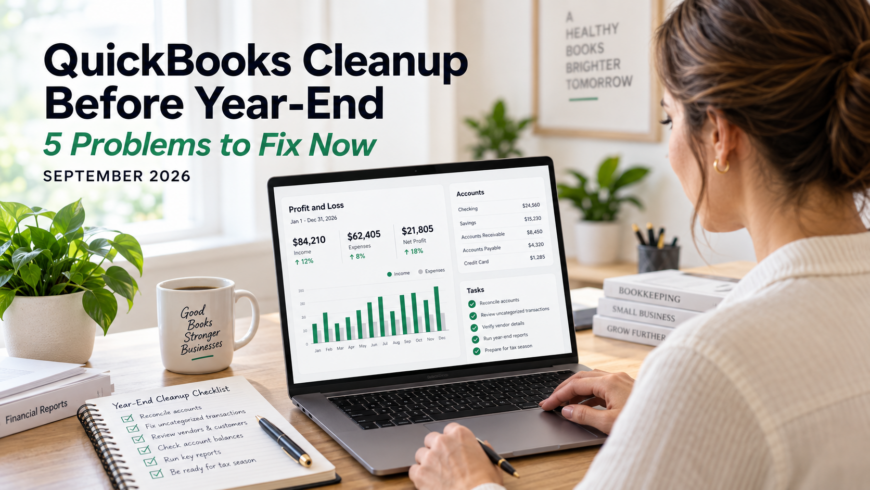
QuickBooks cleanup before year-end may not be at the top of your September to-do list.
After all, December still feels a long way off.
But if your QuickBooks file has unreconciled acs, or balances that simply don’t look right, waiting until year-end usually makes the problem harder—not easier.
September is a much better time to find and fix bookkeeping problems while there is still plenty of time to investigate them.
Here are five common QuickBooks problems small-business owners should look for now.
1. Bank and Credit Card Accounts Aren’t Reconciled
This is the first place we would look.
Your bank feed may show hundreds of transactions in QuickBooks, but that does not mean the account is reconciled.
Reconciliation compares the transactions and ending balance in QuickBooks with the actual statement from your bank or credit card company.
If those numbers don’t agree, something may be missing, duplicated, entered incorrectly, or posted to the wrong account.
A business that hasn’t reconciled since March doesn’t have one reconciliation problem in December.
It has nine months of reconciliation problems.
That is why regular monthly reconciliation is one of the most important parts of maintaining reliable books.
What to check
Look at each:
- Checking account
- Savings account
- Business credit card
- Loan account
- Other financial account appearing on your Balance Sheet
Make sure reconciliations are current and that the ending balances agree with your statements.
2. Duplicate or Misclassified Transactions Are Distorting Your Reports
Bank feeds and automation can save enormous amounts of bookkeeping time.
They can also make it very easy to accept a transaction without looking closely at where QuickBooks puts it.
One transaction assigned to the wrong category may not seem important.
Multiply that by dozens—or hundreds—of transactions over a year and your Profit and Loss statement may tell a very different story from what actually happened.
Duplicates are another problem.
For example, an expense might have been entered manually and then added again when it appeared in the bank feed.
Now your books show the expense twice.
QuickBooks Cleanup Before Year-End Should Include Your Profit and Loss
Run a Profit and Loss report and look down the account totals.
Ask:
- Does anything seem unusually high or low?
- Are expenses showing up in strange categories?
- Are there accounts you don’t recognize?
- Are there negative amounts where you wouldn’t expect them?
- Did an expense suddenly jump compared with prior months?
You don’t have to be an accountant to notice when something looks odd.
Sometimes an unusual number is legitimate.
Sometimes it is the clue that leads you straight to a bookkeeping mistake.
3. Old Undeposited Funds and Uncleared Transactions Are Still Hanging Around
QuickBooks can accumulate bookkeeping leftovers.
Undeposited Funds is a common example.
This account is designed to temporarily hold customer payments before they are grouped into the deposit that appears on your bank statement.
Used correctly, it works very well.
Used incorrectly, it can become a parking lot for transactions that never get cleared.
The same thing can happen with old checks, payments, deposits, or other transactions that continue appearing on reports long after they should have been resolved.
Look for old items
Review:
- Undeposited Funds
- Outstanding checks
- Old deposits
- Uncleared transactions
- Old customer credits
- Old vendor credits
Don’t simply delete something because it looks old. You need to understand why it is there first.
Removing the wrong transaction can create an entirely new reconciliation problem.
4. Customer and Vendor Balances Don’t Match Reality
QuickBooks may show that a customer owes you money when the invoice was actually paid months ago.
Or it may show an unpaid vendor bill that was already handled.
Those balances matter.
Accounts Receivable affects how much money your books say customers owe you.
Accounts Payable affects how much your business appears to owe vendors.
Incorrect balances can distort your financial reports and make business decisions more difficult.
Review your aging reports
Run:
- Accounts Receivable Aging
- Accounts Payable Aging
Look especially closely at older balances.
If an invoice says it is 180 days overdue, ask whether the customer really owes the money.
If a vendor bill has been sitting unpaid for months, confirm whether it is actually outstanding.
The goal isn’t to make old balances disappear.
The goal is to determine what really happened and make QuickBooks reflect it correctly.
5. Your Balance Sheet Has Accounts Nobody Understands
The Balance Sheet often reveals problems that are easy to miss when you only look at income and expenses.
You may see:
- Negative asset balances
- Unusual loan balances
- Old clearing accounts
- Uncategorized assets
- Suspense accounts
- Equity balances that don’t make sense
- Accounts nobody remembers creating
Some of these may be completely legitimate.
Others may be years of bookkeeping clutter quietly following your company from one year to the next.
This is one reason QuickBooks cleanup before year-end matters.
A strange balance is easier to investigate while transactions, statements, receipts, and memories are still relatively fresh.
Don’t Wait Until Tax Time to Find Out Your Books Need Cleanup
Tax preparation is much easier when your bookkeeping has already been reviewed.
Your tax professional should not have to spend valuable tax-season time figuring out why your bank account hasn’t reconciled since February or why QuickBooks says a customer still owes you for an invoice they paid last spring.
Cleaning up earlier gives you time to:
- Locate missing records
- Investigate questionable transactions
- Correct classifications
- Reconcile accounts
- Review financial reports
- Ask questions before year-end deadlines arrive
It also gives you something even more valuable:
Better financial information for running your business during the rest of the year.
A Quick September QuickBooks Checkup
Not sure whether your books need cleanup?
Start with these five questions:
- Are every bank and credit card account reconciled through the most recent statement?
- Does your Profit and Loss look reasonable?
- Are there old balances sitting in Undeposited Funds?
- Do your Accounts Receivable and Accounts Payable reports reflect what customers and vendors actually owe?
- Can you explain the balances on your Balance Sheet?
If the answer to one or more of those questions is “I’m not sure,” that is worth investigating now.
Emerald Consulting Can Help Clean Up Your QuickBooks
Emerald Consulting works with small and mid-sized businesses that need help getting their QuickBooks files organized, accurate, and easier to maintain.
We provide QuickBooks support, bookkeeping review and oversight, monthly bank and credit card reconciliation, downloaded transaction entry, troubleshooting, and remote bookkeeping services.
If your books have fallen behind—or you simply aren’t confident that everything in QuickBooks is where it belongs—we can review your setup and help determine what needs attention.
A little cleanup in September can prevent a much bigger bookkeeping headache in December.
Contact Emerald Consulting for a free 30-minute needs assessment.